
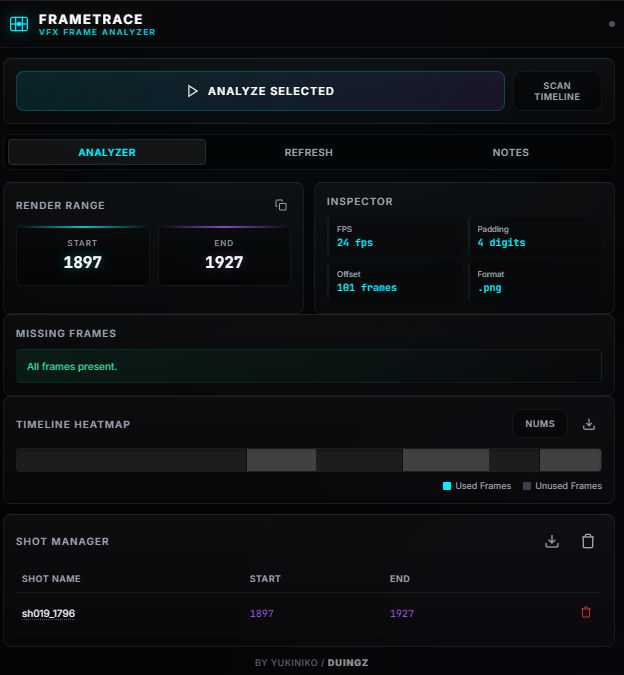
Description
🎬 FrameTrace
Professional Frame Analysis Tool for VFX & Blender Pipelines
📖 Project Overview / Ringkasan Proyek
🇬🇧 English
FrameTrace is an Adobe Premiere Pro extension designed specifically for VFX artists, 3D animators, and Blender users who work with image sequence pipelines.
The Problem:
When you trim or edit image sequences in Premiere Pro, the timeline resetting makes it difficult to track back to the original source frames. Premiere Pro resets the frame numbers when trimming image sequences, making re-rendering or compositing a nightmare.
The Solution:
FrameTrace reads the original frame numbers directly from your file names or metadata and automatically calculates the correct, exact render range needed for your 3D software (like Blender) or compositing tools.
🇮🇩 Indonesian
FrameTrace adalah ekstensi Adobe Premiere Pro yang dirancang khusus untuk seniman VFX, animator 3D, dan pengguna Blender yang bekerja dengan pipeline image sequence (urutan gambar).
Masalah:
Saat Anda memotong (trim) atau mengedit image sequence di Premiere Pro, reset timeline membuatnya sulit untuk melacak kembali ke frame sumber asli. Premiere Pro mengatur ulang nomor frame saat memotong image sequence, membuat proses re-render atau compositing menjadi sangat rumit.
Solusi:
FrameTrace membaca nomor frame asli langsung dari nama file atau metadata Anda dan secara otomatis menghitung rentang render yang benar dan tepat yang dibutuhkan untuk perangkat lunak 3D Anda (seperti Blender) atau alat compositing.
❓ Why FrameTrace Exists? / Mengapa FrameTrace Dibuat?
🇬🇧 English
In standard animation and VFX pipelines, a common pain point occurs when editing image sequences directly in Adobe Premiere Pro. Native Premiere behavior resets frame numbers starting from zero when you trim a clip. This breaks the link to the original sequence and makes exporting accurate render ranges back to 3D software (like Blender) or compositing packages almost impossible.
FrameTrace exists to solve this exact problem by acting as a bridge. It reads the raw file data of your edited sequence and restores the original frame information, saving you hours of tedious manual calculation.
🇮🇩 Indonesian
Dalam alur kerja animasi dan VFX standar, masalah umum terjadi saat mengedit image sequence secara langsung di Adobe Premiere Pro. Perilaku bawaan Premiere mereset nomor frame kembali ke nol setiap kali Anda memotong (trim) sebuah klip. Hal ini memutuskan tautan ke sequence asli dan membuat proses ekspor rentang render yang akurat kembali ke perangkat lunak 3D (seperti Blender) atau aplikasi compositing menjadi hampir mustahil.
FrameTrace hadir untuk memecahkan masalah ini dengan bertindak sebagai jembatan. Plugin ini membaca data file mentah dari sequence yang Anda edit dan memulihkan informasi frame asli, menghemat waktu Anda dari perhitungan manual yang membosankan.
✨ Key Features / Fitur Utama
| Feature / Fitur | 🇬🇧 Description | 🇮🇩 Deskripsi |
|---|---|---|
| 🔍 Frame Range Detection | Accurately detects original source frame ranges of trimmed clips. | Mendeteksi rentang frame sumber asli dari klip yang dipotong dengan akurat. |
| ⚠️ Missing Frame Detection | Identifies dropped or missing frames in your sequence. | Mengidentifikasi frame yang terlewat atau hilang dalam sequence Anda. |
| 🔢 Frame Padding Detection | Automatically recognizes file padding (e.g., 0001 vs 1). |
Secara otomatis mengenali padding file (contoh: 0001 vs 1). |
| 🌡️ Timeline Heatmap | Visualizes sequence usage and overlaps directly in the timeline. | Memvisualisasikan penggunaan sequence dan tumpang tindih langsung di timeline. |
| 🔄 Smart Replace Sequence | Refresh renders with a single click after updating source files. | Segarkan render dengan satu klik setelah memperbarui file sumber (Render Refresh). |
| 📝 Shot Notes System | Attach custom notes to specific shots for collaborative review. | Lampirkan catatan khusus pada shot tertentu untuk ulasan kolaboratif. |
| ⚙️ Blender Range Generator | Outputs exact start/end frames formatted for Blender pipelines. | Menghasilkan frame awal/akhir yang diformat khusus untuk pipeline Blender. |
| 📋 Shot List Generator | Export organized shot lists based on your current edit. | Mengekspor daftar shot yang terorganisir berdasarkan editan Anda saat ini. |
| 🖼️ Sequence Inspector | Deep dive into image sequence metadata and properties. | Menelusuri metadata dan properti image sequence secara mendalam. |
💻 Compatibility / Kompatibilitas
| Software / Perangkat Lunak | Version / Versi |
|---|---|
| Adobe Premiere Pro | 2022 and newer (2022+) |
| Operating System | Windows / macOS |
| CEP Extensions | Supported / Didukung |
🚀 Installation Guide / Panduan Instalasi
🇬🇧 English
Follow these steps to install the FrameTrace extension in Adobe Premiere Pro:
- Download the repository or the latest release
.zip. - Copy the
FrameTracefolder to the CEP extensions directory:- Windows:
C:\Program Files (x86)\Common Files\Adobe\CEP\extensions - Mac:
/Library/Application Support/Adobe/CEP/extensions/
- Windows:
- Enable CEP debug mode (if the plugin is unsigned):
- Open Command Prompt and run:
(Changereg add "HKEY_CURRENT_USER\Software\Adobe\CSXS.11" /v PlayerDebugMode /t REG_SZ /d 1 /fCSXS.11to match your Premiere Pro CSXS version if needed).
- Open Command Prompt and run:
- Restart Adobe Premiere Pro.
- Open the plugin natively from the top menu:
Window → Extensions → FrameTrace
🇮🇩 Indonesian
Ikuti langkah-langkah berikut untuk menginstal ekstensi FrameTrace di Adobe Premiere Pro:
- Unduh repositori atau rilis
.zipterbaru. - Salin folder
FrameTraceke direktori ekstensi CEP:- Windows:
C:\Program Files (x86)\Common Files\Adobe\CEP\extensions - Mac:
/Library/Application Support/Adobe/CEP/extensions/
- Windows:
- Aktifkan mode debug CEP (jika plugin tidak ada signature):
- Buka Command Prompt dan jalankan:
(Ubahreg add "HKEY_CURRENT_USER\Software\Adobe\CSXS.11" /v PlayerDebugMode /t REG_SZ /d 1 /fCSXS.11sesuai dengan versi CSXS Premiere Pro Anda jika perlu).
- Buka Command Prompt dan jalankan:
- Mulai ulang Adobe Premiere Pro.
- Buka plugin secara langsung dari menu atas:
Window → Extensions → FrameTrace
🛠️ How to Use / Cara Penggunaan
🇬🇧 English
- Import: Import your rendered image sequence (e.g., from Blender) into Premiere Pro.
- Edit: Trim and edit the clip normally in the Premiere timeline.
- Select: Select the trimmed clip in the timeline.
- Analyze: Open FrameTrace and click the "Analyze Selected Clip" button.
- Copy: FrameTrace will calculate the exact original frames. Copy the Blender render range.
Example Output:
Start Frame: 216
End Frame: 500
You can now paste these values directly into Blender to render only what is visible in your Premiere edit!
🇮🇩 Indonesian
- Impor: Impor image sequence yang telah di-render (contoh: dari Blender) ke Premiere Pro.
- Edit: Potong dan edit klip seperti biasa di timeline Premiere.
- Pilih: Pilih klip yang dipotong di timeline.
- Analisis: Buka FrameTrace dan klik tombol "Analyze Selected Clip".
- Salin: FrameTrace akan menghitung frame asli dengan tepat. Salin rentang render Blender.
Contoh Output:
Start Frame: 216
End Frame: 500
Kini Anda dapat menempelkan nilai ini langsung ke Blender untuk me-render hanya bagian yang terlihat di editan Premiere Anda!
🔄 Workflow Example / Contoh Alur Kerja
🇬🇧 English
The standard pipeline optimized by FrameTrace:Blender ➡️ Image Sequence ➡️ Premiere Animatic ➡️ FrameTrace ➡️ Blender Re-render
🇮🇩 Indonesian
Alur kerja standar yang dioptimalkan oleh FrameTrace:Blender ➡️ Image Sequence ➡️ Premiere Animatic ➡️ FrameTrace ➡️ Blender Re-render
🎯 Who is this for? / Untuk Siapa Ini?
🇬🇧 English
- 🧑🎨 VFX Artists: Tracking frame data between edit and composite workflows.
- 🧊 Blender Animators: Avoiding rendering unnecessary frames.
- 🎬 3D Filmmakers: Managing complex animatic-to-final render pipelines.
- ⚙️ Technical Artists & Pipeline Developers: Automating tedious frame calculations and list generation.
🇮🇩 Indonesian
- 🧑🎨 Seniman VFX: Melacak data frame antara alur kerja editan dan composite.
- 🧊 Animator Blender: Menghindari me-render frame yang tidak perlu.
- 🎬 Pembuat Film 3D: Mengelola pipeline kompleks dari animatic ke hasil render akhir.
- ⚙️ Technical Artist & Pengembang Pipeline: Mengotomatisasi perhitungan frame dan pembuatan daftar shot yang membosankan.
🗺️ Roadmap / Rencana Pengembangan
🇬🇧 English
- Direct API integration with Blender (Add-on sync)
- Export directly to After Effects compositions
- AI-based automated shot detection
- Support for DaVinci Resolve
🇮🇩 Indonesian
- Integrasi API langsung dengan Blender (Sinkronisasi Add-on)
- Ekspor langsung ke komposisi After Effects
- Deteksi shot otomatis berbasis AI
- Dukungan untuk DaVinci Resolve
🚀 Future Vision / Visi Masa Depan
🇬🇧 English
Our long-term vision is to evolve FrameTrace from a simple frame calculator into a comprehensive, automated pipeline bridge connecting non-linear editors (Premiere/DaVinci) directly with 3D suites (Blender/Maya/Unreal) and compositing tools (Nuke/After Effects). We aim to automate round-tripping for modern filmmakers and indie animation studios.
🇮🇩 Indonesian
Visi jangka panjang kami adalah mengembangkan FrameTrace dari sekadar kalkulator frame menjadi jembatan pipeline otomatis dan komprehensif yang menghubungkan editor non-linear (Premiere/DaVinci) secara langsung dengan paket 3D (Blender/Maya/Unreal) dan alat compositing (Nuke/After Effects). Kami bertujuan untuk mengotomatisasi alur kerja bolak-balik bagi pembuat film modern dan studio animasi indie.
👨💻 Author / Penulis
Created and maintained by Renando (Nando)
VFX Artist, 3D Animator & Creative Tool Developer
Built to optimize your pipeline. 🚀
Search Keywords: premiere pro plugin, image sequence tool, vfx pipeline, blender workflow, frame range calculator, render range tool, animation pipeline, timeline analysis plugin, premiere frame analyzer, premiere-extension, blender-render-tool, vfx-tools.
Details
Secure transaction. Protected by DuingZ Forge buyer guarantee.